Now Access Computer from Mobile Phone. Just install the simple application on your smartphone. And access your computer from any part of the world. Yes, its possible all you need is an application. In your Android or iPhone. You can access images, videos, any files from anywhere. You can open the Documents view them and close them. You can also see the pics. And transfer them to your smartphone. There is an application Polkast which will let you, to access a computer from mobile phone.
Try this: How to use whatsapp voice calling feature.
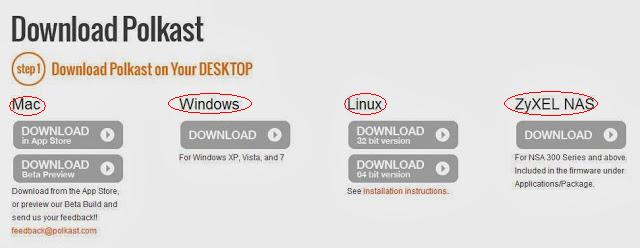
Follow the steps below. And access computer from mobile phone. Read the full post. Visit Polkast website. And below you will see ‘Download Polkast.’ There are two steps, step 1 – Desktop and step 2 – Mobile. Select the first step and download the Desktop version. Now you will be directed to download page.
You can access a computer from a mobile phone from any part of the world.
If you follow all the steps above. Then you can easily access a computer from mobile phone. It is the best way to obtain. You can access from any part of the world. It will also make you Tech expert in front of your friend. Just imagine you are out and you can access a computer from mobile phone. Do share this simple software. Sharing is caring.
This post was last modified on March 26, 2018 03:30
Learn how to increase virtual memory in Windows 11, which in turn will improve system…
Learn how to remove OneDrive from File Explorer in Windows 11 with account unlinking, Group…
Learn how to find largest files on Windows 11 with File Explorer, Storage Settings, and…
Learn how to turn off OneDrive on Windows 11 by going to sync settings, unlinking…
Learn how to insert calendar in PowerPoint with templates, tables, or Excel. Present professional and…
Learn how to create templates in Outlook, which in turn will save you time, improve…
This website uses cookies.