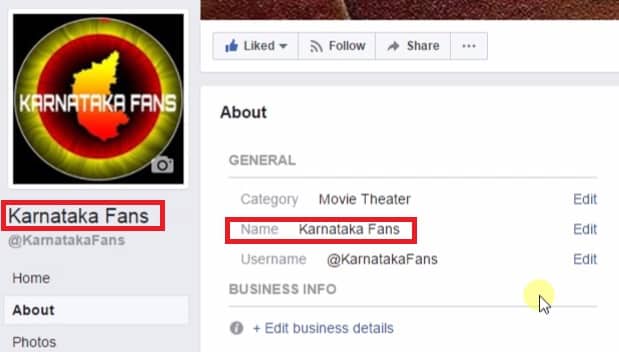
I will tell you a trick to change Facebook Page name. You can change your Facebook Page Name even after 1000+ likes. I will share two different methods. Both methods are working and users can easily rename Facebook Pages.
Facebook is the most popular social networking site in the world. Facebook is leading at the top position among the entire social networking website such as Twitter, Google+, Instagram, and much more. As Facebook has a majority of users around the world. Henceforth, Facebook day by day changes and manages its terms and conditions daily or monthly.
Read more: How to Open Facebook When it is Blocked by Server – Open Facebook in School and Colleges
While talking about Facebook pages, we all know that you are not going to get the option of “Change Page Name” after getting 200 likes or above. The same I am going to tell you in this amazing trick. Yes, you are going to learn that how you can change your Facebook page name after 200 likes.
There is a limitation which Facebook has defined that you can’t change your Facebook page name after getting 200 likes. But, don’t worry today we will learn 2 different methods to do so.
Read more: How to Find Someone on Facebook using a Picture
This trick is personally tested and found to be working. Although, there are several methods available, but those are not easy to follow and are very difficult to understand. We did a lot of research and found these two methods to change Facebook Page name.
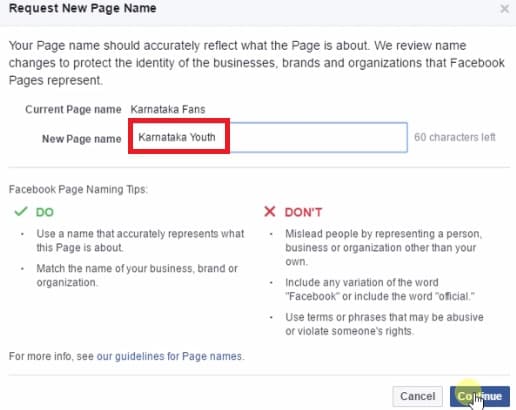
That’s it. Now, your request for page name has been submitted to Facebook. After approval, your Facebook page name will be changed. It usually takes 15 minutes but for bigger pages, it can take up to 3 days.
Read more: How to Share Facebook Post on WhatsApp
If above method does not work in your region then, you can use this method. Check the full method below.
These are the best methods to change facebook page name. Users can change their Facebook page even after 1000+ likes. If you know any other method to change Facebook Page name. Then, do comment below and don’t forget to share this article with your friends.
This post was last modified on December 28, 2021 19:06
Learn how to increase virtual memory in Windows 11, which in turn will improve system…
Learn how to remove OneDrive from File Explorer in Windows 11 with account unlinking, Group…
Learn how to find largest files on Windows 11 with File Explorer, Storage Settings, and…
Learn how to turn off OneDrive on Windows 11 by going to sync settings, unlinking…
Learn how to insert calendar in PowerPoint with templates, tables, or Excel. Present professional and…
Learn how to create templates in Outlook, which in turn will save you time, improve…
This website uses cookies.

View Comments
My page refused to change up. Its telling me page name can't be updated!
I've tried for almost two month but am not getting an option of Edit name
Check with the name, is it available?