Hello friends, Today I will share a method to deactivate Facebook messenger. Users can completely disable Facebook Messenger from their Smartphone. You can also keep your Facebook running and de-activate your Facebook Messenger.
Facebook Messenger is a messaging platform which is offered by Facebook. Formerly it was known as Facebook Chat but, later on, Facebook created it as a messaging platform. There comes a time when you make you don’t want to use Facebook and plan to deactivate your Facebook account. But, Facebook does not deactivate the Facebook Messenger for the account whom you are deactivating. Definitely, deactivating a Facebook account doesn’t mean that will also deactivate Facebook Messenger. Well, there is a quite simple solution which makes possible to deactivate Facebook Messenger.
It is a frequently asked question that should I deactivate Facebook Messenger or not. Let me tell you that it totally depends upon you. If you have deactivated your Facebook account and want to disable the Facebook Messenger then, of course, you can do so. But, if you have permanently deleted it, then you don’t have to do anything for that. Frankly, if you want to gain access to your Facebook account back after some days or months, then I will recommend that you do not do so also if you’re going to stop messaging besides of the deactivation of your Facebook account. Then, yes, you can do it right now.
Read more: How to Unsend a Message on Facebook Messenger using Android, iPhone or Windows PC
The foremost and primary thing which you need to do before you deactivate Facebook Messenger is that make sure you have deactivated your Facebook account. Yes, you heard right. Basically, what Facebook does is that it does not enable the option to deactivate the Facebook Messenger from those accounts which are not deactivated. Once you deactivate your Facebook account, then you will be able to get the option to deactivate the Facebook Messenger. Otherwise, it is totally not possible to deactivate Facebook Messenger without deactivating that Facebook accounts directly. Also, make sure that you have the app of Facebook Messenger on your Android or iPhone.
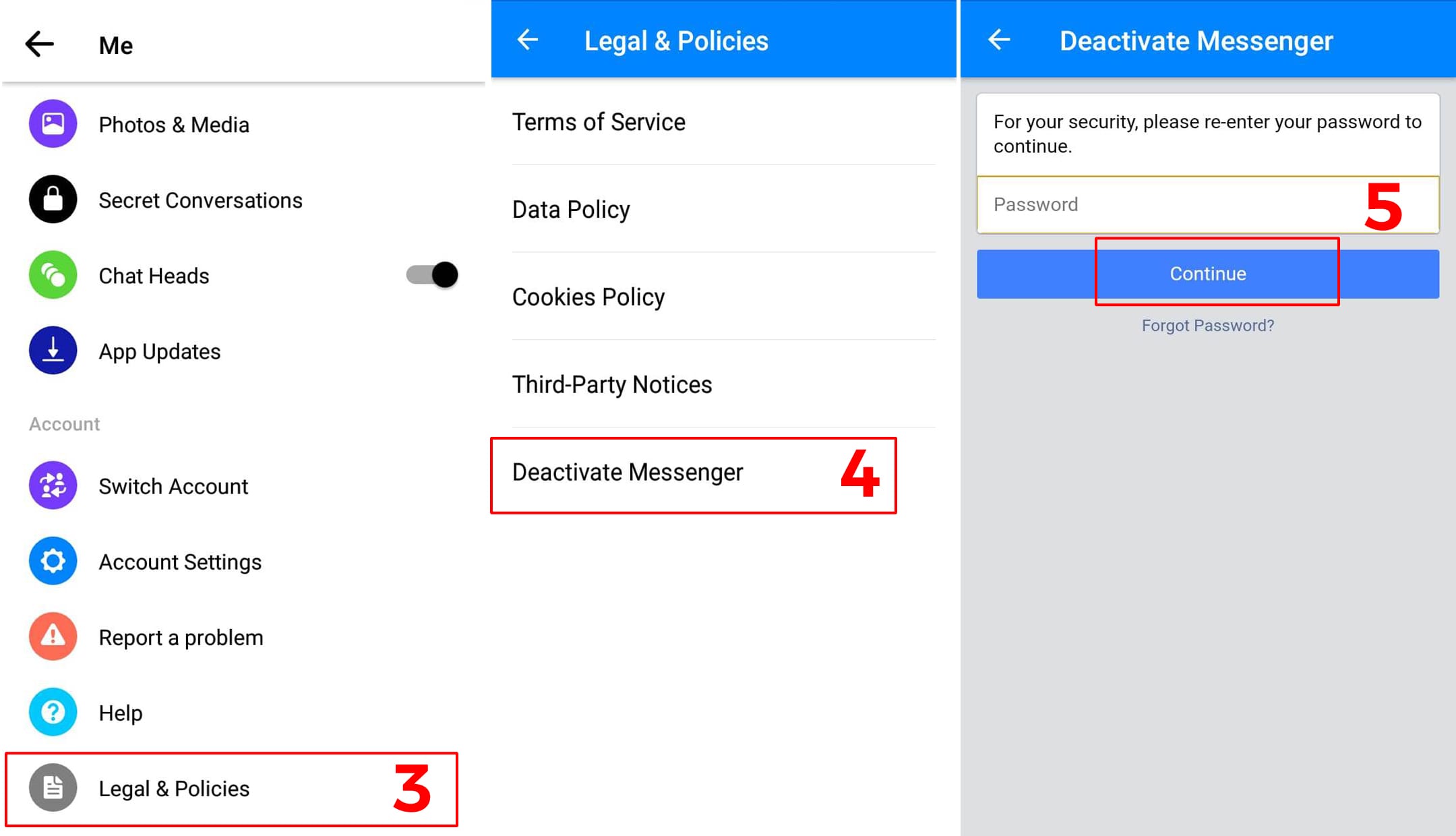
If you will deactivate the Facebook Messenger that it will not delete your Facebook messages. Such that you can regain it whenever you want. This is a very important part of the article where you will learn how you have to deactivate the Facebook Messenger from your phone. Basically, this method is authentic and genuine, which do not requires anything other than the Facebook Messenger app. I have explained the guide to you guys in a very simple way. So, it will be easy for you that you can understand it and follow up the entire procedure very quickly.
Read more: How to Start Facebook Messenger Secret Conversations – Send Secret Messages on Facebook
This was all about how you have to deactivate Facebook Messenger. Basically, there is no other way to deactivate Facebook Messenger. So, I would like to recommend you that do not find any other way if you are doing so and follow up the method which is mentioned in this article. Besides of it, I have also explained why should you do this and what thing is necessary before you do so. I hope you will deactivate Facebook Messenger after thinking twice on your mind. You can share this article with other guys who really want to know that how does the Facebook Messenger is deactivated.
Learn how to increase virtual memory in Windows 11, which in turn will improve system…
Learn how to remove OneDrive from File Explorer in Windows 11 with account unlinking, Group…
Learn how to find largest files on Windows 11 with File Explorer, Storage Settings, and…
Learn how to turn off OneDrive on Windows 11 by going to sync settings, unlinking…
Learn how to insert calendar in PowerPoint with templates, tables, or Excel. Present professional and…
Learn how to create templates in Outlook, which in turn will save you time, improve…
This website uses cookies.