Everyday several Facebook users upload videos. About 70% of the Videos are posted again and rest 30% are unique. Some videos grab people attention and become viral easily. These days if you have a good unique video then it is easy to make it viral. Recently you must have observed Facebook auto-play videos. It instantly play all videos which are present on your homepage. Just after the launch of Facebook auto-play video. Several videos has become viral and daily 72 million people are viewing videos on Facebook.
Several people want to download Facebook video and watch them offline anytime. But, Facebook don’t allow users to watch Facebook video offline.
Don’t worry as there are few tricks which will allow you to watch Facebook video offline. All you need to do is follow simple steps. Well, best part of this trick that you don’t need any software to watch Facebook video offline.
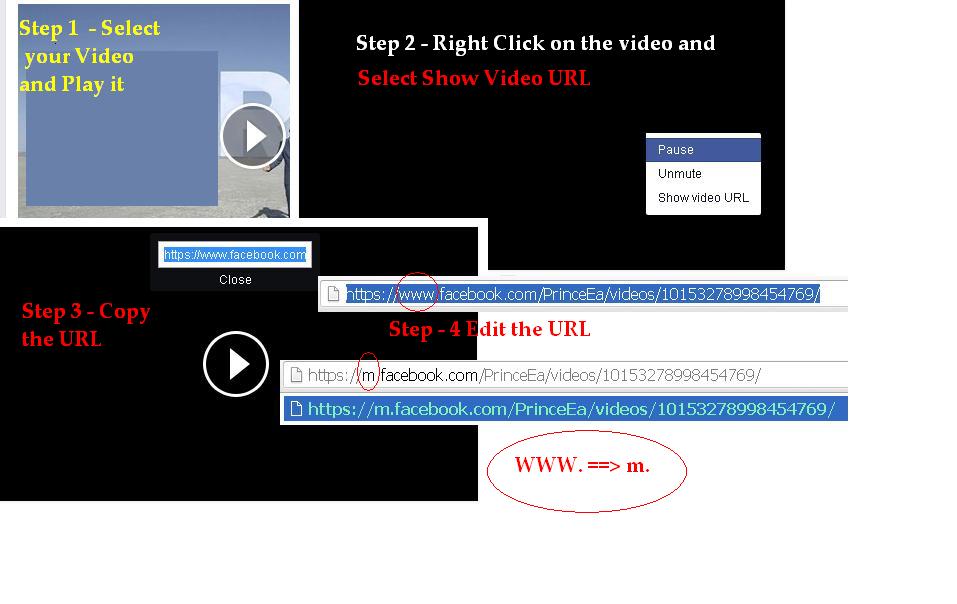
Download Facebook videos on your Smartphone, PC, laptop and almost every device which has internet connection. It is one of the safe and fastest way to download Facebook videos. I will disclose the trick step by step. So, make sure you follow every step.
Well you don’t need any software to download Facebook videos. This trick is free, simple, safe and fast. So, download as many Facebook videos you want and watch them offline.
Learn how to increase virtual memory in Windows 11, which in turn will improve system…
Learn how to remove OneDrive from File Explorer in Windows 11 with account unlinking, Group…
Learn how to find largest files on Windows 11 with File Explorer, Storage Settings, and…
Learn how to turn off OneDrive on Windows 11 by going to sync settings, unlinking…
Learn how to insert calendar in PowerPoint with templates, tables, or Excel. Present professional and…
Learn how to create templates in Outlook, which in turn will save you time, improve…
This website uses cookies.