Enable copy paste in Command Prompt cmd in Windows 10, 8.1 and 8. Activate copy paste in CMD Screen. Latest method to copy paste in CMD screen. You can copy any command and paste it directly into your Command Prompt. Users can also paste any command directly inside a CMD. This method is easy and suitable to copy or paste commands in CMD.
You must have experienced the problem in writing prompt CMD screen due to codes. Well, these codes are very confusing, and the only developer can understand these codes. These codes consist of unique characters and it has no relation to English. It is very much difficult for a newbie to understand these codes.
The worst part of the Command prompt is you can’t copy-paste. When you can’t copy-paste, it becomes hard for you to remember these codes and write in Command prompt CMD.
Read more: How to check your IP Address
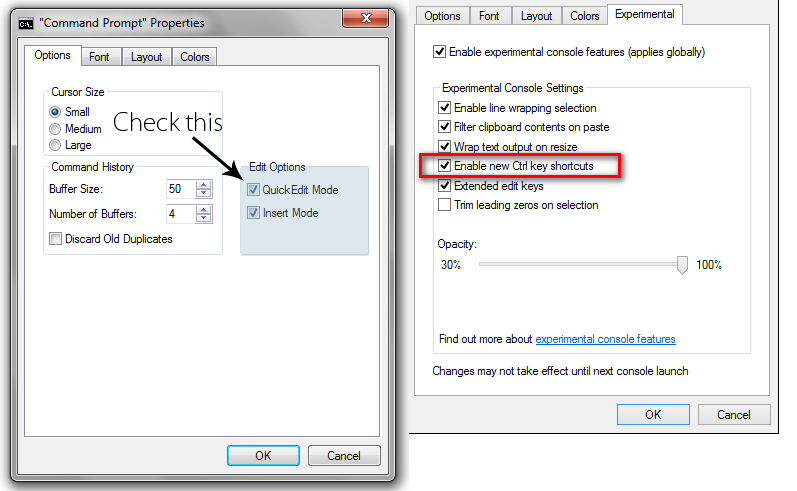
In some Windows, version options are a bit different. Then, Tick on Enable Ctrl Key shortcuts and click on OK.
Read more: What is Error 651 and How to Fix Error 651 in Windows 7, 8, 8.1 & 10 – 5 Methods
Now, you can easily Copy and Paste in Command Prompt CMD. There are few other ways to Ctrl+V in CMD.
It is the best method to copy and paste in command prompt in CMD. Users can directly paste inside command prompt CMD in their Windows PC/laptop. You can also share your method to copy/paste in Command Prompt. Do share this article with your friends and let them know about this fantastic trick.
This post was last modified on October 12, 2020 01:45
Learn how to increase virtual memory in Windows 11, which in turn will improve system…
Learn how to remove OneDrive from File Explorer in Windows 11 with account unlinking, Group…
Learn how to find largest files on Windows 11 with File Explorer, Storage Settings, and…
Learn how to turn off OneDrive on Windows 11 by going to sync settings, unlinking…
Learn how to insert calendar in PowerPoint with templates, tables, or Excel. Present professional and…
Learn how to create templates in Outlook, which in turn will save you time, improve…
This website uses cookies.