Categories: HOMEHOW TO

How to Transfer Facebook Birthdays and Events to Google Calendar

Despite of the fact that Facebook reminds us about all our friends’ birthdays and special events, many of us still miss out wishing our friend’s at the right time because we may not be logged-in to Facebook every time. So, what can be the solution for this? Receive SMS notification of Facebook Birthdays and Events on your mobile phone. Yes, this will alert you with all the birthday dates and events at the right time. As we all have Google account we can transfer Facebook events and birthday list to the Google calendar and then setup a SMS notification to notify you with the events. [SMS – Short Message Service]

Transfer Facebook Birthdays and Events to Google Calendar

Transfer Facebook Birthdays, Events to Google Calendar

  • First a fall log-in to your Facebook account. On the left side of your screen you can find “apps” option.
  • Click on “apps” and then select “Events”.
  • Now a new screen is popped out showing the upcoming events and birthdays. Now copy the birthday link address by right clicking on the birthday URL present on the right side of the screen.
    Read more : How to Fix Google Play store Error 403, 491, 492, 498, 905
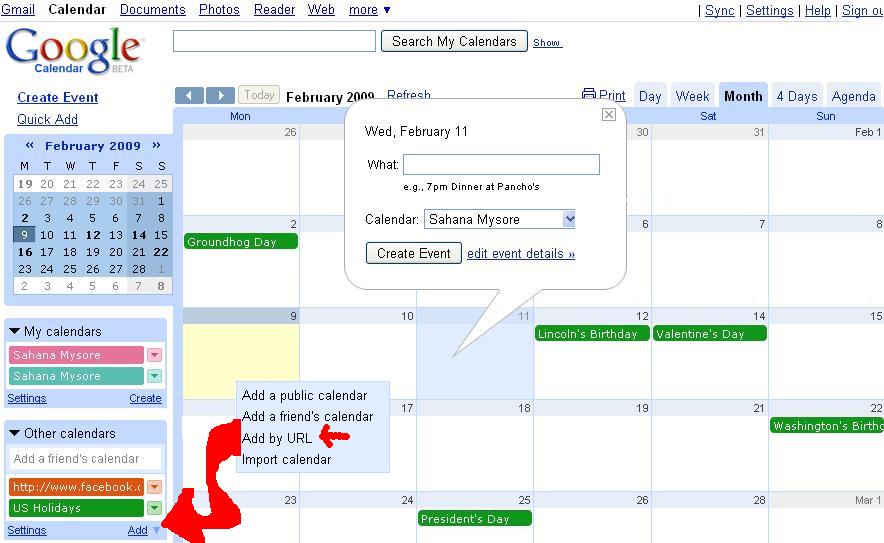
  • Now access your google calendar. On the left side of the screen you can see an option called “other calendar”. Click on the drop down arrow beside this option and then select “add by URL” option.
  • A new pop-up screen is displayed. Paste the URL link in the URL place provided and then click on “add calendar”.
  • Now all the birthdays of your friend’s will be transferred from Facebook to Google calendar.

This is the best way to transfer Facebook Friend’s Birthdays to Google Calendar.

How to set-up SMS notification for Facebook Events, Birthday

  • Click on the drop down arrow of the imported calendar and select calendar settings.
  • Enter your mobile number under the “reminder and notifications” section.
    Know more : How to Restore your Deleted Whatsapp Messages
  • You can even select the time when you want to receive the notification and also you can delete some of the unnecessary birthdays to avoid any unnecessary notifications.
  • Now click on “OK” once you are done with all the necessary changes.

That’s it. All the birthday of your friend’s are imported from Facebook to your Google calendar and you can wish all your friend’s without missing anyone of them.

CONCLUSION

Get all important notifications on your mobile phone. Just transfer all your important reminders and almost everything. Get a text message on your mobile phone directly. Easily sync Facebook friends birthday, events to google calendar.

Was this article helpful?
YesNo

This post was last modified on March 16, 2018 22:53

Ekaant Puri

I love to write about the latest technology. My work is to write on HowTo, Top 10 and tech solving topics.

Recent Posts

Top 10 Google Photos Alternative

Check out the top 10 Google Photos alternatives for secure, organized, and easy access to…

14 hours ago

Top 10 Advantage of Using Themify Themes

Discover the Top 10 Advantage of using Themify Themes, which include a drag and drop…

16 hours ago

How to Unblock a Website on Chrome – 5 Methods

Learn how to unblock a website on Chrome with easy methods, which include clearing cache,…

2 days ago

How to Turn Off Touchscreen on Chromebook – 5 Easy Steps

Learn how to turn off touchscreen on Chromebook, which is a simple task. Also, fix…

2 days ago

How to Use Expert RAW App for Professional Photography – Complete Details

Learn how to use the Expert RAW app for professional photography. We have included features…

5 days ago

Difference Between Peacock Premium and Premium Plus – 4 Main Key Differences

Compare which plan is right for you by looking at Peacock Premium and Premium Plus.…

5 days ago

This website uses cookies.