Are you a user of Apple iPhone 6s? Okay, great then!. For how long you have been using it? Any issues with it? Yeah, I know man! Touch ID Sensor is getting overheated sometimes and even stops functioning totally. Right? Okay the issue is being seen on many iPhone 6s and 6s Plus phones, and you are also on the league!
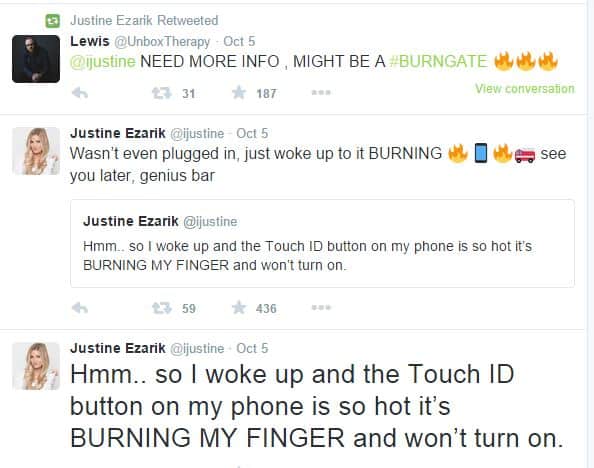
Like all other iPhone series, iPhone 6s also started to follow their steps by throwing out many issues to its users one by one. This story came into the spotlight when many users started complaining about the same on official Twitter and Support Forum Pages of Apple.
Read more: How to Backup iPhone to Mac
Users reported that the Touch ID sensor becomes “Extremely Hot” suddenly, and at the end, it totally stops working. However, Apple Support Centre has not replied to any query regarding this fact, and users seem to be angry for the same. Well, all Apple mobiles have got some serious issues viz.
Must Read: How to Clear RAM on iPhone 11
Hope Apple will solve the problem soon! If you are facing the same issues on your Phone, try contacting Apple Support Forum now! Don’t ignore it because the problem may ultimately lead to damage of other phone parts in the long run!
This post was last modified on November 27, 2019 16:38
Learn how to increase virtual memory in Windows 11, which in turn will improve system…
Learn how to remove OneDrive from File Explorer in Windows 11 with account unlinking, Group…
Learn how to find largest files on Windows 11 with File Explorer, Storage Settings, and…
Learn how to turn off OneDrive on Windows 11 by going to sync settings, unlinking…
Learn how to insert calendar in PowerPoint with templates, tables, or Excel. Present professional and…
Learn how to create templates in Outlook, which in turn will save you time, improve…
This website uses cookies.