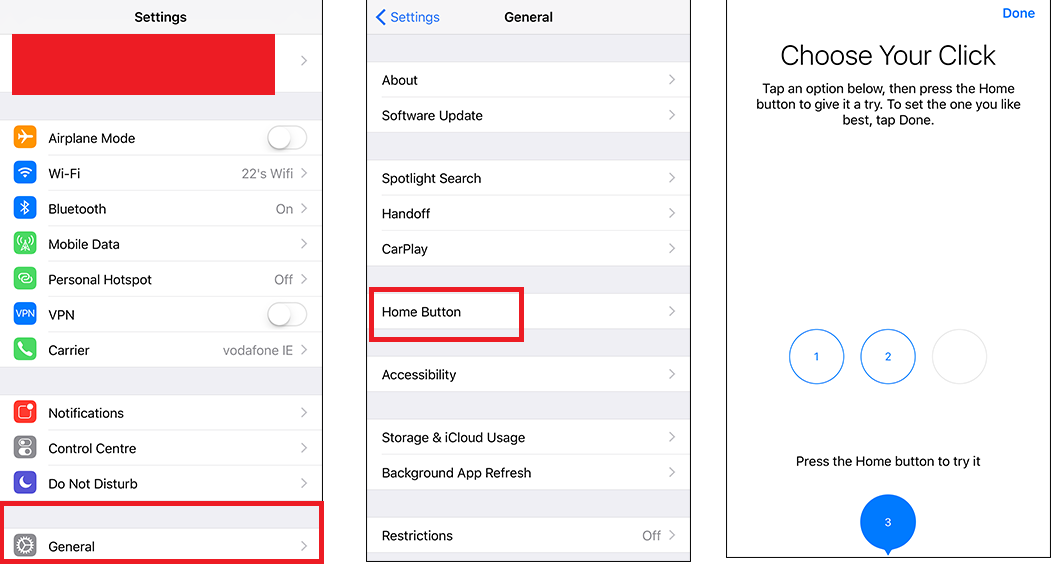
Hello friends, Today I will tell you a trick to Fix iPhone 7 home button click intensity. Users can adjust the intensity of their iPhone 7 and iPhone 7 plus. Users can fix the issue of iPhone 7 button difference. Fix the sensitivity of iPhone 7 home button.
The Home button is not really a button but a sensation generated by the Taptic Engine. Apple has also included Taptic Engine in iPhone 6s and iPhone 6s plus. This Taptic Engine helps in producing tactile sensations and sometimes the sounds from the speakers also create an illusion. You may feel that there is a click when you press the button or a vibration the other time. But in reality, you are getting none of these. It is just the simulation that creates this. Such haptic responses are used even in games to give user new palpable experiences.
Read more: How to FIX iPhone Stuck on Apple Logo Without Restoring – Top 10 Best Methods
New vibration options emerged on iPhone 7 and iPhone 7 plus. The new one being Synchronized and the old one called Staccato default vibrations. This feature harmonizes with the text tone and then gives unique effects depending on the text tones. Taptic Engine provides the faintest vibrations which the iPhone users only can distinguish.
Fortunately, Apple provides the user to feel the home button in three different ways. Users can change the intensity of iPhone 7 Home Button Click.
Each click feels differently. There are many Taptic experiences. One of them is when it gives feedback while changing date and time. There are wheels associated with this in the settings. When you change the date and time, there comes a sound with a tap, a simulation of spinning wheels. The effect is quite faint but noticeable.
Read more: How To Unblock Someone on Facebook from Mobile, iPhone, app or PC/Laptops
The best benefit is the 3D Touch experience the Appleinsiders provide to their users. In iPhone 6s when you long press the home screen, you get a ‘thump’ in response. In iPhone 7, there are more of these artificial responses. The iMessage effects are remarkable ones. The fireworks and lasers give the actual feeling of rumbling bursts and waves of light whiz through. The keys of Piano, strumming guitar strings and tactile typing in iPhone 7 blows away any other features the haptic apps provide.
Read more: How to Control PC/Laptop/Mac from iPhone or Android Phone via WiFi – 100% Working
Taptic Engine is the best so far for creating sensations. It uses a linear actuator. The other haptic developers do not provide this high – an effect. It provides a true force feedback and it is not a simple vibration. Previously, Apple Watch had this technology in which one user could send the heartbeat (simulation) to another user. It was also used to make a simulation of a rubber band smacking back when the user reached the limit of scrolling. Not many iPhone users are familiar with this feature, and rarely do they know about Taptic Engine. It won’t be long before this secret is out unless you help to share this article. I hoped the article was informative. Do drop comments in the comment box.
Learn how to increase virtual memory in Windows 11, which in turn will improve system…
Learn how to remove OneDrive from File Explorer in Windows 11 with account unlinking, Group…
Learn how to find largest files on Windows 11 with File Explorer, Storage Settings, and…
Learn how to turn off OneDrive on Windows 11 by going to sync settings, unlinking…
Learn how to insert calendar in PowerPoint with templates, tables, or Excel. Present professional and…
Learn how to create templates in Outlook, which in turn will save you time, improve…
This website uses cookies.