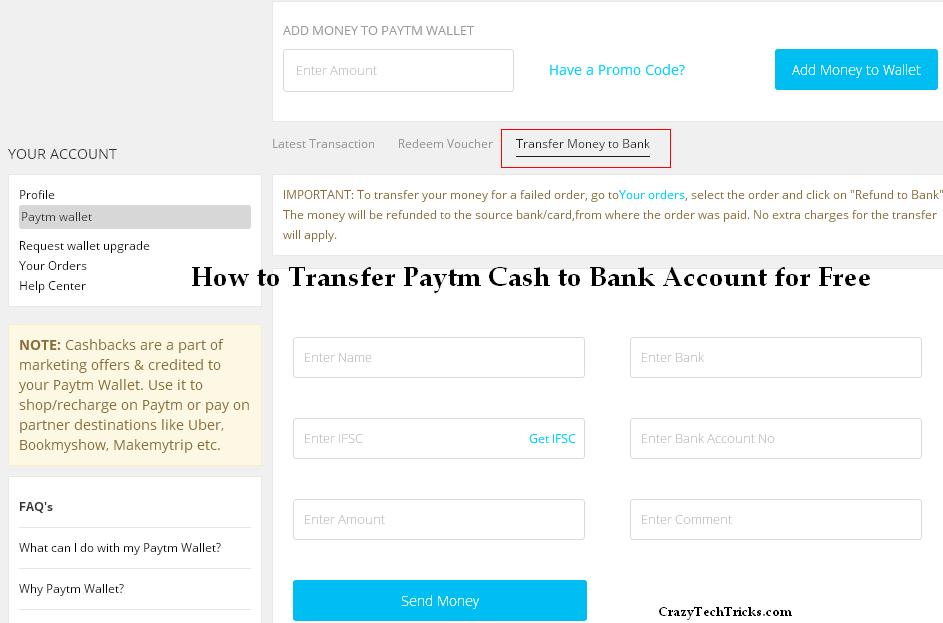
Now, Paytm users can easily transfer Paytm cash to Bank account in few seconds. Paytm has launched this service few weeks ago. Several users has already transferred there paytm cash to bank account. Well, it is very easy to transfer the money. Ill share some easy tips and tricks, which will guide you the best.
Paytm is a platform where users can recharge their mobile phones, electricity bill and users can buy almost all kind of products. It has over 100 million registered users. The best part of paytm is cashback offers. Paytm offer several coupons and provide users various kinds of discounts and cash back. This epic feature of Paytm has made them famous and most used website for mobile recharge in India.
Note : Requirements to transfer paytm cash to bank account.
Daily maximum limit to transfer is Rs. 5,000.
Monthly maximum limit to transfer is Rs. 25,000.
Yes, you don’t need to pay any transaction charges. Usually paytm charges 4% per transaction. But, if you follow this trick then you can transfer without transaction fee.
To transfer Paytm cash to your bank account you need some Paytm cash. You can easily get paytm cash.
You have done it, Paytm will transfer money to your Bank account.
Its one of the easiest method to transfer Paytm cash to your bank account. But, Paytm will charge 4% transaction fee. If you transfer Rs. 2,000 then Paytm will charge Rs. 80.
Visit Paytm wallet.
As your wallet is not setup. So, you’ll get an ‘error’ messgae. Now, send a SMS *TMB* to 53030. Send SMS from your registered mobile number with your paytm account.
After sending the SMS. You’ll need to wait for minimum of 48 hours or up to 7 days. It depend upon your Bank, how long it take to verify you. Once you conformed, you can transfer money to your bank easily.
These are the methods to transfer paytm cash to bank account. Well, free method is bit long. But, its free. ;). Another method charge 4% per transaction. If you know any other method, then do share with us. 🙂
This post was last modified on December 31, 2021 17:14
Learn how to increase virtual memory in Windows 11, which in turn will improve system…
Learn how to remove OneDrive from File Explorer in Windows 11 with account unlinking, Group…
Learn how to find largest files on Windows 11 with File Explorer, Storage Settings, and…
Learn how to turn off OneDrive on Windows 11 by going to sync settings, unlinking…
Learn how to insert calendar in PowerPoint with templates, tables, or Excel. Present professional and…
Learn how to create templates in Outlook, which in turn will save you time, improve…
This website uses cookies.