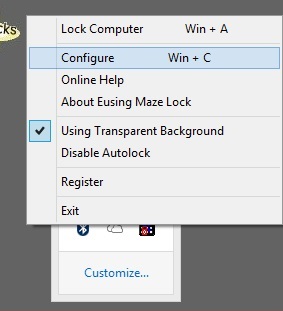
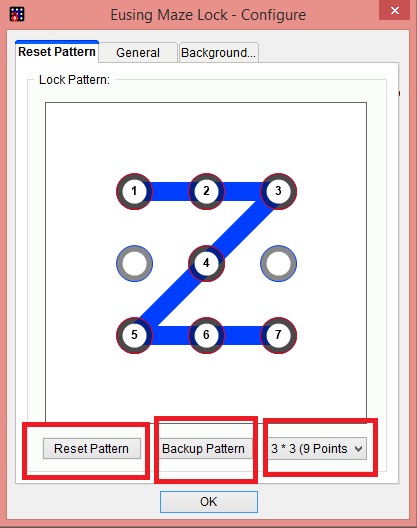
Yes! You can set pattern lock on Windows OS such as Windows 7, 8, 8.1 and 10. Setup pattern lock on your Windows PC/Laptop. It will be same pattern lock like you do on your Smartphone. You can add much bigger pattern lock on your PC screen. Users need to join the points, in the same way, You have added the pattern lock on your computer.
The pattern lock is one of the best passwords to secure your system. The best part is, you don’t need to type the password. In pattern lock, you need to match the desired pattern to unlock your system. These pattern locks were made famous by smartphone. Currently, 65% Android and 51% iOS users are using pattern lock. It is considered as the new way of locking.
Read more: How to Setup Laptop Alarm Clock that Works in Sleep Mode Windows 10, 8.1 ,8 and 7
Earlier this locking system was limited to smartphone only. But, now you can set pattern lock on Windows 7, 8, 8.1 and 10.
Know more: How to Setup Alarm Clock For Windows 10, 8.1, 8, and 7 – Desktop Alarm Clock Download
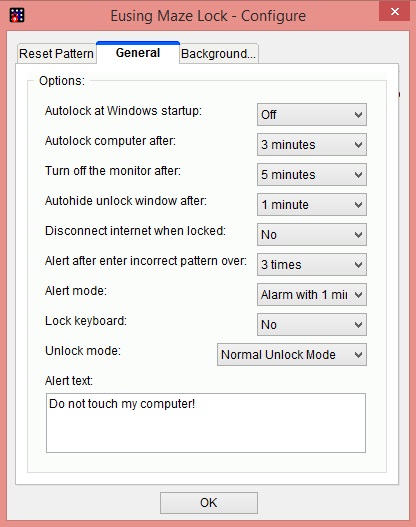
You can also set pattern lock on Windows PC/Laptop. You can setup pattern lock in a similar way to open your PC. If you fail to unlock your pattern lock in 3 attempts the, it will lock your computer for 1 minute and start playing warning sound. Share this article with your friends and help them in using pattern lock on Windows PC/Laptop
This post was last modified on March 6, 2022 16:38
Learn how to increase virtual memory in Windows 11, which in turn will improve system…
Learn how to remove OneDrive from File Explorer in Windows 11 with account unlinking, Group…
Learn how to find largest files on Windows 11 with File Explorer, Storage Settings, and…
Learn how to turn off OneDrive on Windows 11 by going to sync settings, unlinking…
Learn how to insert calendar in PowerPoint with templates, tables, or Excel. Present professional and…
Learn how to create templates in Outlook, which in turn will save you time, improve…
This website uses cookies.