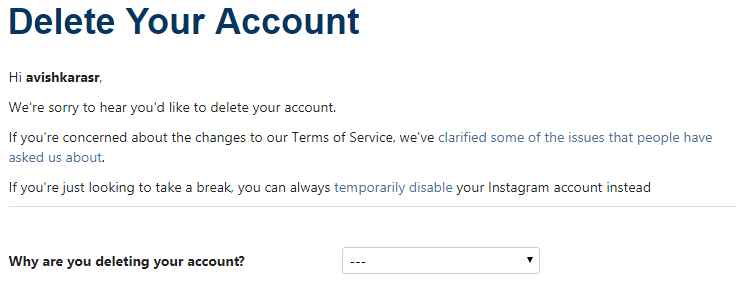
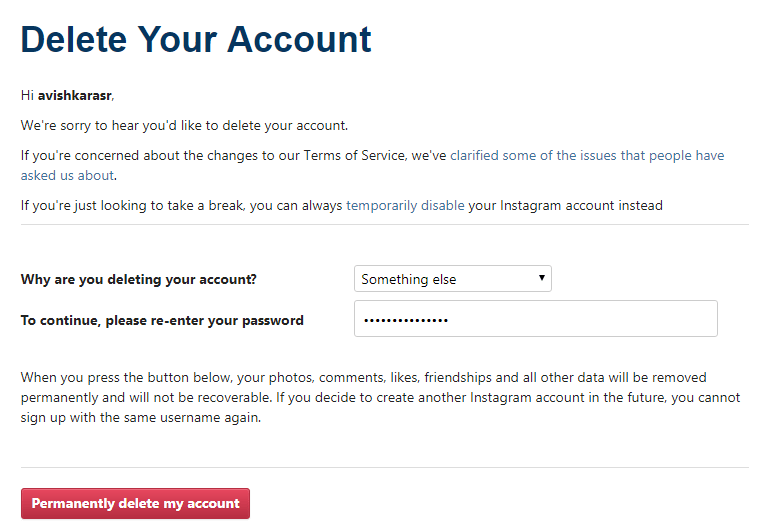
Users can now permanently delete ones Instagram account. This guide is on how to delete an Instagram account permanently. You can delete your Username from Instagram account permanently. Users can use this method on Android, iPhone, or Windows PC/Laptops. It is an official way to delete an Instagram account. You can remove your Instagram account online using the official website.
You can delete an Instagram account permanently. Reason to delete an Instagram account permanently can be varied from personal to anything. Many people are now addicted to Instagram and all the social media one could grab hold of it the latest the better. In that case, several people want to get rid of Instagram account forever after being introduced to a new social media or another way around. However, you can even deactivate Instagram and later activate it back. But Users can also delete Instagram Account Permanently. Once you remove your Instagram, none will be available to find you on Instagram.
Read more: How to Get Instagram Private Profiles – Make Instagram Private
Disabling and deleting an Instagram account is a different thing. Disabling your Instagram account will only temporarily deactivate your Instagram account. But, removing your Instagram account will permanently delete your Instagram account. Also, remember that disabling will make your profile hidden from everyone. But to eliminate an Instagram account permanently will erase everything from your profile like photos, videos, saved posts, tagged photos, etc.
Read more: How to View a Private Instagram Without Following – Is it Possible?
However, if you have disabled your Instagram account, then you can use it later at any time. Disable feature will not show your account on Instagram until you do not re-activate it. But, deleting your Instagram profile will permanently delete it and do not re-activate it even if you log in with correct credentials.
Read more: How to View a Private Instagram Without Following – Is it Possible?
Note: Deleting your Instagram account is a non-reversible method where disabling your Instagram account is a 100% reversible method. If you wish to use your Instagram account later, then you must choose the disable feature. But, to delete an Instagram account permanently you should continue reading this article.
Yes, You can quickly delete your Instagram account permanently from Android or iPhone. Removing your Instagram profile is not a tuff task. You can immediately delete an Instagram account by visiting their Official website. We will not use any other app or website. We are using the Instagram official website to remove our Instagram account permanently.
That’s it. Meanwhile, your account will be deleted successfully.
Read more: How to Download Instagram Stories Secretly from PC/Laptops or Android or Mac or iPhone
It is an official method to delete an Instagram account permanently. By using this method, you can quickly remove an Instagram account permanently. Remember, deleting your Instagram account is not a reversible method. But, disabling an Instagram profile is a fully reversible method. You can share this article with your friends, who want to delete an Instagram account permanently from Android, iPhone or Windows PC/Laptop.
This post was last modified on February 8, 2022 00:12
Learn how to increase virtual memory in Windows 11, which in turn will improve system…
Learn how to remove OneDrive from File Explorer in Windows 11 with account unlinking, Group…
Learn how to find largest files on Windows 11 with File Explorer, Storage Settings, and…
Learn how to turn off OneDrive on Windows 11 by going to sync settings, unlinking…
Learn how to insert calendar in PowerPoint with templates, tables, or Excel. Present professional and…
Learn how to create templates in Outlook, which in turn will save you time, improve…
This website uses cookies.