Crazy Tech Tricks

  • Home
  • How To
  • Top 10
  • Android
  • iOS
  • Windows 10
  • Microsoft Office

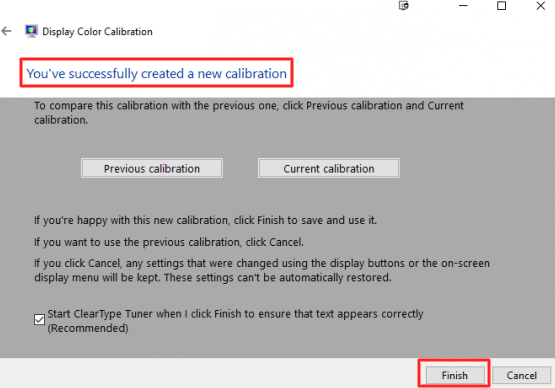
How to Calibrate the Monitor in Windows 10 PC/Laptop – Reset Color Calibration

Last updated on October 4, 2020 by Ekaant Puri Leave a Comment

Right-click on your Windows 10 PC-Laptop screen and select the Display settings option - How to Calibrate the Monitor in Windows 10

It is the best method on how to calibrate the monitor in Windows 10. You can calibrate hp, dell or any other company monitor by using this method. Users can also reset color calibration in Windows 10 PC/Laptops using these ways. It will help you to improve the color quality of your Monitor. It will […]

Filed Under: HOW TO, HOME, PC/Laptop, Windows 10, Windows 7, Windows 8, Windows 8.1 Tagged With: Calibrate the Monitor, Calibrate the Monitor in Windows 10, how to calibrate monitor windows 10, reset color calibration windows 10

DMCA.com Protection Status

Recommended

  • How to Create a Template in Excel 2010, 2013 & 2016
  • How to Change App Store Country or Region on iPhone and iPad – 7 Easy Steps
  • How to Choose Low-code Platforms? 2020 Edition
  • How to Downgrade Android Version – Is it Possible?
  • How to Unpair Apple Watch Without iPhone – Complete Guide with 6 Easy Steps

We’re Social

Facebook  Twitter  Instagram  Pinterest  YouTube

Crazy Tech Tricks © 2015-2022. All rights reserved. All logos and trademarks belongs to their respective owners.

  • About Us
  • Disclaimer
  • Privacy Policy
  • Cookie Policy
  • Advertise With Us